Arizona E-Tag
- 3.8
- Rating
- 10.00K
- Installs
- Free
- Price

 Analysis by App-foxy
Arizona E-Tag is a free sports app from Arizona Dept Game and Fish built around Arizona’s electronic tagging process. I approached it less like a general outdoors companion and more like a focused field tool: its usefulness depends on whether you need to handle an Arizona game tag digitally, rather than whether you want maps, trip planning, species information, or a broad hunting log.
That narrow purpose is also its main appeal. Instead of treating the phone as a place to read general information after a trip, the app is intended to be part of the tagging workflow itself. In my experience, that makes the most sense when you want to reduce paper handling and keep an official task close at hand while you are outdoors. It is not the kind of app I would install casually just to browse sports content.
What Arizona E-Tag actually offers
The app belongs to the sports category, but that label can make it sound broader than it is. Its identity is much more specific: it is an electronic tagging app associated with Arizona’s game and fish authority. The developer shown for it is Arizona Dept Game and Fish, which gives the app a clear connection to the state process it supports.
You May Also Like

 AccuWeather: Weather Radar
AccuWeather Review: A Quick, Clear Forecast for Everyday Decisions
For everyday plans, the best forecast is the one you can understand quickly. AccuWeather makes rain timing, radar, and local conditions easy to act on, with a few trade-offs.

 Hill Climb Racing
Why Hill Climb Racing Still Turns Crashes Into One More Run
A tiny car, a bumpy hill and one more upgrade: Hill Climb Racing keeps resurfacing because its simple chaos makes every near-miss feel personal.

 AliExpress - Shopping App
AliExpress Makes Global Shopping Feel Personal, but Shoppers Bear the Risk
AliExpress turns a global marketplace into a pocket-sized discovery engine. Its reach is useful, its shopping loop compelling, and its trade-offs easy to miss.

 Lords Mobile: Kingdom Wars
Lords Mobile Is a Kingdom-Building Routine, Not a Quick Match
A case-by-case verdict on the building, battles, device demands, and social commitments that make Lords Mobile rewarding for some players and exhausting for others.

 PDF Scanner app - TapScanner
TapScanner Makes Paperwork Easier to Capture, Check, and Share
TapScanner makes scanning with a phone feel less like a rescue operation and more like a dependable step in getting work done. Its capture tools are useful, though not flawless.

 Block Blast!
 Shows How Much a Puzzle Game Can Leave Out
A quiet grid game shows why puzzle players increasingly value instant clarity, repeatable skill and low-pressure play—and where the genre still needs to catch up.
More From Our News Desk
View All News


That connection matters because electronic tagging is not simply a digital notebook. A useful tagging tool has to fit into a real sequence: you may be away from home, handling equipment, dealing with a harvested animal, and trying to complete an administrative step without losing track of what you have entered. The value of Arizona E-Tag comes from serving that moment directly, not from offering a large collection of unrelated features.
I also like that the app’s basic cost is easy to understand. It is free to download and use as a free-access tool, so there is no purchase decision to calculate against the price of a hunting trip or gear. That does not automatically make every user experience perfect, but it removes one common barrier. You can consider it based on fit and reliability rather than an upfront fee.
The age classification is Everyone, which is consistent with an administrative utility rather than an entertainment product. The app was released in May 2022, and the current version is 2.0.11. It requires at least OS 9, so anyone using a device below that minimum should treat compatibility as the first practical check before planning to rely on it.
Its public reception is reasonably mixed rather than overwhelmingly enthusiastic: the average is 3.8 from around seventy ratings, with around thirty written reviews. I read that as a signal to keep expectations practical. The app appears useful for its intended job, but a focused government service app should be judged by whether it helps you complete that job clearly, not by whether it feels as polished or feature-rich as a major commercial outdoor platform.
A realistic day in the field
Imagine that I am preparing for an Arizona outing and have already handled the required licensing and tag arrangements. I would install the app before leaving, open it while I still have a stable connection, and make sure I understand where the electronic tagging workflow begins. That preparation is more important than it sounds. In the field, I do not want my first interaction with an official tool to happen while I am tired, distracted, or dealing with poor reception.
After a successful hunt, the phone becomes a practical record-keeping device rather than a source of entertainment. I would use the app as the designated place for the tagging step, checking each screen carefully before submitting anything. My advice is to slow down at the points where an identifier, location, date, or animal detail may matter. A few extra seconds spent reviewing an entry is a better trade-off than rushing because the app looks simple.
This is one of the less obvious strengths of a specialized app: it can help separate official tagging from personal notes. I would still keep my own backup notes about the trip, but I would not treat a notebook, a text message to myself, or a generic notes app as a replacement for the state’s electronic tagging workflow. Those alternatives may help me remember what happened, yet they do not serve the same administrative purpose.
How it compares with ordinary alternatives
The usual alternatives fall into three groups: paper records, a phone’s notes app, and broad hunting or outdoors applications. Paper can be dependable when a phone battery is low, but it is easier to misplace, damage, or separate from the rest of the trip paperwork. A notes app is quick and flexible, but it is not designed around Arizona’s tagging process. A general outdoors app may be excellent for maps, weather, routes, or personal logs, but those features do not make it an equivalent electronic tag tool.
Arizona E-Tag therefore wins through specialization. I would choose it over a generic app when the immediate task is Arizona electronic tagging. I would choose a broader outdoor app alongside it when I need navigation, route planning, weather, or a long-term record of trips. The important trade-off is that this is not an all-in-one replacement for every tool a hunter may carry.
That distinction also prevents a common mistake: expecting the app to become more valuable simply because it is installed. If I am not participating in the Arizona process it supports, the free price does not create much practical value. A free app that I never need is still clutter. For an Arizona user with a relevant tag, however, the same narrow focus can make it worthwhile.
Small workflow choices that make a difference
My first tip is to prepare before the trip, not at the moment the tagging action becomes necessary. Open the app, confirm that it runs on the phone you plan to carry, and become familiar with the path you will use. I would also make sure the phone is charged and protected from the conditions of the outing. This is not a criticism unique to Arizona E-Tag; it is simply the reality of depending on a mobile administrative tool outdoors.
My second tip is to keep the app separate from your trip-planning routine. I would not assume that installing it means I can leave every other resource at home. Navigation, communication, weather information, and personal notes serve different purposes. Treating the electronic tag app as one part of the kit makes the workflow more resilient than asking it to perform jobs it was not created for.
My third tip is to review information before finalizing an entry. A specialized form can feel straightforward, which may encourage fast tapping. In a field situation, distractions are common, and the cost of correcting a mistake may be much higher than the time needed to reread the details. I would use a deliberate pause before submission and keep any confirmation or completion screen available until I am satisfied that the process is finished.
A fourth useful habit is to think about device handoff. If more than one person in a group may be responsible for the tagging task, decide in advance whose phone will be used and who will check the details. That avoids a last-minute argument over accounts, battery life, or which device contains the relevant information. The app may be simple, but the surrounding workflow still benefits from a clear plan.
Where the experience can feel limited
The biggest limitation is its narrow scope. I would not recommend it to someone looking for a complete hunting companion, a wildlife encyclopedia, a mapping service, or a social community. The app’s purpose is specific, and that means it may spend little or no time on the features that make broader outdoor apps engaging between trips.
There is also a practical dependence on the phone itself. Battery problems, a damaged device, poor preparation, or difficulty using a screen outdoors can turn a convenient digital process into a frustrating one. The fact that the app is free does not remove those field conditions. I would carry a sensible backup plan for essential information and avoid treating any single phone-based tool as the entire trip’s safety net.
The rating around 3.8 suggests that the experience is not flawless for everyone. I would interpret the written feedback as a reason to test the current version before relying on it in a high-pressure situation, especially if I have not used electronic tagging before. A short practice run at home can reveal whether the navigation feels clear to me and whether my device is comfortable to use.
Another trade-off is that a government-focused utility may feel less polished than a paid commercial app. That is not necessarily a problem. For this kind of tool, accurate task completion matters more to me than animations, customization, or a stylish interface. Still, users who expect constant updates, extensive personalization, or a rich dashboard may find the experience too plain.
Who will get the most value
The strongest audience is an Arizona hunter who needs the state’s electronic tagging process and wants a dedicated app rather than improvised notes. For that person, the free access is meaningful because the app can support a specific required or expected part of the outing without adding another purchase. It is especially sensible for someone who prefers having official task handling on the phone they already carry.
It can also suit occasional users who do not want to learn a large outdoor platform. A broad app may offer more, but more menus can create more opportunities for confusion when the only urgent job is tagging. Arizona E-Tag’s focused role may be easier to remember and easier to explain to another member of a group.
I would be more cautious recommending it to visitors who are only passing through, people who do not need electronic tagging, or users whose main goal is navigation and trip discovery. They may get more value from a mapping or outdoors app, with this tool added only if their Arizona activity specifically calls for it. Free installation should not be confused with universal usefulness.
It is also not my first choice for someone who wants a permanent personal archive of every outing. I would use a separate journal or outdoor log for photographs, routes, observations, and memories. The electronic tag app should remain the precise instrument for its official task, while a personal archive can hold the richer story of the trip.
My buy-or-skip verdict
Arizona E-Tag is worth installing when you need Arizona’s electronic tagging workflow, and it is easy to justify because access is free. I would install it before an applicable outing, test it on my device, and treat it as a focused administrative tool rather than a complete sports platform. Its value is practical and situational: high for the right Arizona user, low for everyone else.
I would not pay for an alternative merely because it has a more attractive interface if the task is simply electronic tagging. A paid app could be better for maps, planning, or personal records, but those are different needs. Since Arizona E-Tag has no stated purchase cost, the real question is whether its specialized purpose matches your trip.
My final recommendation is therefore conditional but positive. If you are dealing with Arizona electronic tags, keep this app ready and prepare before you leave. If you want a broad hunting toolkit, use something else for those wider jobs and do not expect this one app to replace it. For its intended audience, Arizona E-Tag earns its place by focusing on a task that generic notes, paper, and general outdoor apps do not handle in the same way.
FAQs for Arizona E-Tag
01What is the primary function of the Arizona E-Tag app?
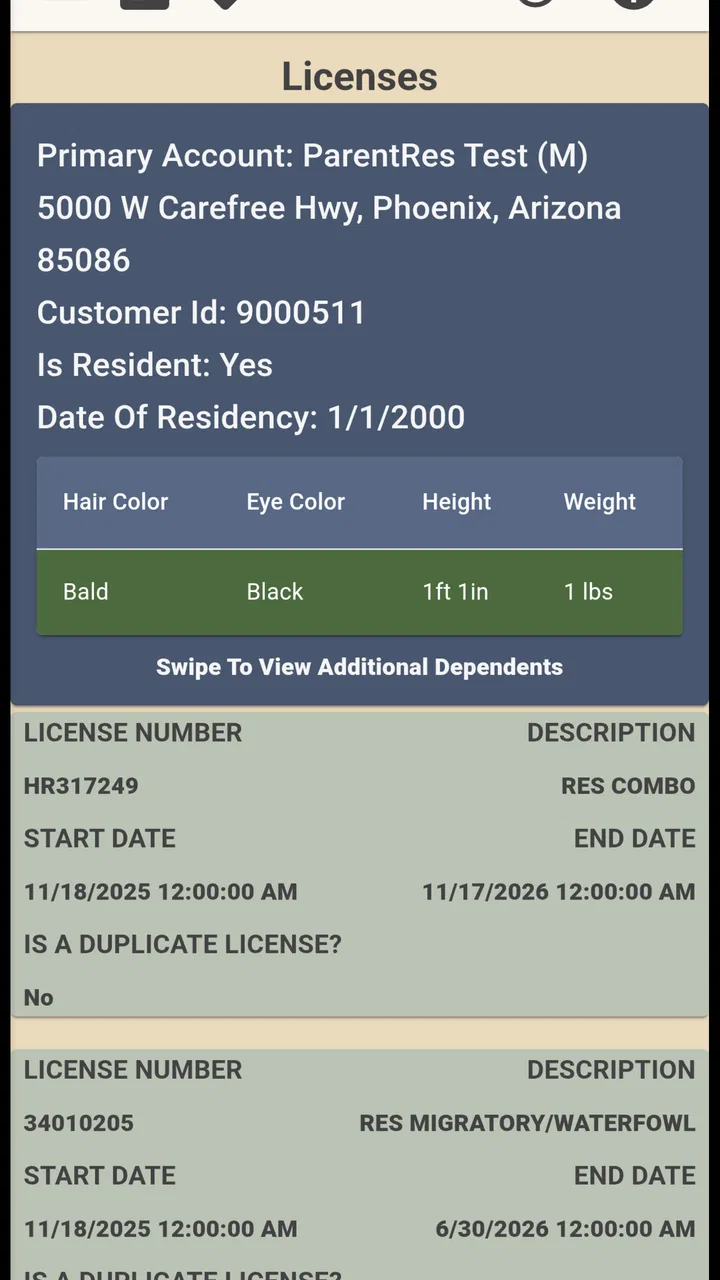
The Arizona E-Tag app is designed to simplify the process of tagging and reporting harvested game in Arizona. It provides hunters with a convenient, digital solution to comply with state regulations, eliminating the need for physical tags. Users can fill out and submit their tags directly through the app, ensuring compliance with wildlife management rules.
02Is the Arizona E-Tag app available for both Android and iOS devices?
Yes, the Arizona E-Tag app is available for both Android and iOS platforms. You can download it from the Google Play Store for Android devices or the Apple App Store for iOS devices. This ensures that hunters using different types of smartphones can access the app's features for their tagging needs.
03Does the Arizona E-Tag app work offline?
The Arizona E-Tag app allows some offline functionality, such as creating and storing tags. However, users must connect to the internet to submit their completed tags. This ensures that all data is accurately reported to the Arizona Game and Fish Department while providing flexibility in areas with limited connectivity.
04Are there any fees associated with using the Arizona E-Tag app?
The Arizona E-Tag app itself is free to download and use. However, users must still purchase the appropriate hunting licenses and tags from the Arizona Game and Fish Department. The app streamlines the tagging process but does not replace the need for official licensing and permits.
05How secure is my personal information on the Arizona E-Tag app?
The Arizona E-Tag app employs robust security measures to protect users' personal information. Data encryption and secure servers are used to ensure that your data, including personal and hunting information, is safe. The app complies with state regulations to ensure your data is handled responsibly and securely.
Pros
- User-friendly interface for quick navigation.
- Secure payment options for peace of mind.
- Real-time updates on tag processing status.
- Efficient customer support via in-app chat.
- Environmental benefits with paperless tags.
Cons
- Limited to Arizona residents only.
- Requires stable internet connection.
- Some features need premium subscription.
- Occasional delays in tag processing.
- Compatibility issues on older devices.

Arizona E-Tag
Gallery